


The Checkpoint Flag in PEAK is a new placeable item introduced with the ROOTS update, serving as a crucial safety net for those taking on the formidable mountain climb.
The Checkpoint Flag comes in handy, especially if used strategically, as it’s one of the most important additions for survival. It becomes useful when you’re either facing dangerous ascents, risky jumps, or exploring challenging new biomes where unexpected threats abound.
This new mechanic gives you a second chance to recover from mistakes and keep your run alive, but how does it work? Here’s everything you need to know about the Checkpoint Flag’s working in PEAK.
Table of contents
PEAK Checkpoint Flag, explained
The Checkpoint Flag is an item that you can place, and it creates a one-time respawn location anywhere in a level. When you activate the Checkpoint Flag, it gives one safe respawn. Your character will return at the flag’s spot, typically retaining their gear but with potential status effects intact, depending on the situation.
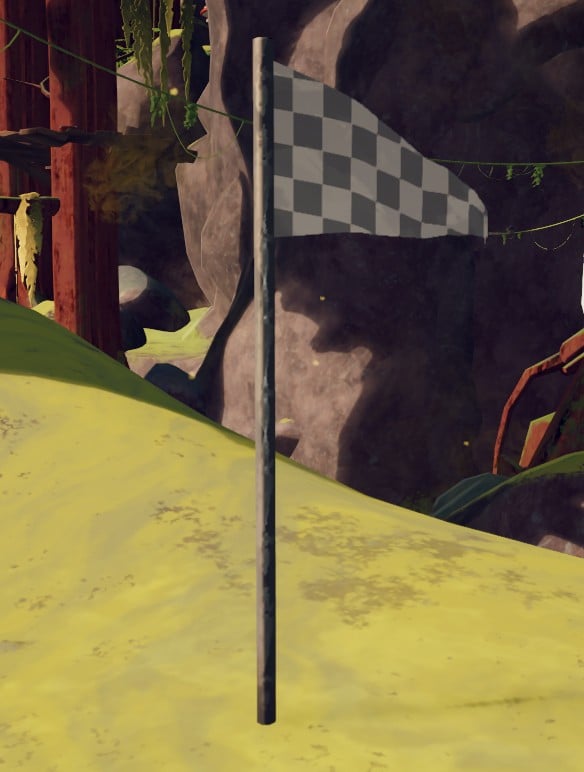
It can be placed on most surfaces, providing immediate flexibility if you’re about to face challenges or threats. When you or a teammate dies, the fallen player appears at the flag’s location instead of restarting the whole run. It gets consumed after a single use, which makes it even more essential to take risks and use it strategically.
What I suggest is to try placing the flag near tricky climbs, hazardous areas, or before major risks that feature new hazards, such as poisonous spores, spiders, scorpions, and the Roots biome’s unstable terrain.
How to get a Checkpoint Flag in PEAK
You can find the Checkpoint Flag within regular, big, or Explorer’s luggage. It’s received as part of the ROOTS update and is accessible directly in your inventory after you enter the new biome or complete the introductory section of the Roots update content.
If the flag is not yet in your inventory, completing initial Roots biome challenges or visiting nearby vendors or supply stations is recommended to unlock or purchase the item.

How to use the Checkpoint Flag in PEAK
To plant the Checkpoint Flag in PEAK, simply hold down the interact or “plant” button while standing on a valid surface in the level. But before doing that, make sure to locate a safe spot.
Find a stable surface or safe area where you can set it without risk of immediate enemy attacks or environmental hazards. Also, make sure it’s in your inventory or quick-use slot.
After confirming the location, hold the button until the flag visibly sets on the ground or surface. A clear visual cue shows the flag has been planted successfully. Don’t worry, it will stay active until used or until you transition to a new biome, so you can rely on it for a one-time respawn if needed.
Keep in mind that flags are wiped when you enter a new biome, so you’ll need to place a new one every time the environment shifts. This new feature is especially valuable for solo players, as it helps tackle challenging vertical climbs.
In co-op, only the player who places the flag enjoys the benefits. So, the rest of the teammates need to coordinate placement and timing.







Published: Nov 6, 2025 02:03 pm