




Don’t beat yourself up for struggling to uninstall 2XKO from your PC. Yes, it’s 2025 and getting rid of a game shouldn’t take more than a few seconds of your life. But Riot Games and its IPs don’t follow this rule, all thanks to the reliable but stubborn Vanguard anti-cheat.
2XKO is Riot’s latest multiplayer fighting experience, which has just released into early access on PC and is available for free. As easy as it is to download and set up, you may want to uninstall the game for a variety of valid reasons, whether it’s to free up space, fix performance issues, or move on to a different title.
If you’re unable to delete it from your PC, don’t worry: This 2XKO uninstallation guide has everything you need to know.
Table of contents
Step-by-step guide to uninstall 2XKO during early access (2025)

Getting rid of 2XKO from your device isn’t straightforward like most other games, but it’s not a difficult process either. Just follow these steps to easily get the work done:
Step 1: Make sure you exit the game first
You can’t uninstall 2XKO while it’s running in the background. Simply close the game like you usually do, or exit it from the Task Manager app.
Step 2: Exit Vanguard
This is an important step. If you’re struggling to uninstall a Riot game using the common “Add or remove apps” Control Panel feature, chances are that Vanguard is blocking the process. The anti-cheat runs in the background even after you close the game and prevents any modification to game files, including uninstallation. To fix this, you need to uninstall or exit Vanguard first.
If you plan on playing other Riot games like League of Legends or VALORANT, don’t uninstall Vanguard. You can simply close it from the system tray: Click on the upward arrow near the right corner of the system tray, right-click on the Vanguard icon, and select Exit.
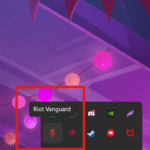
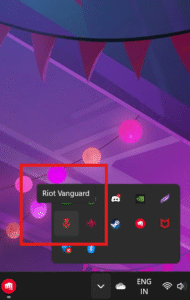
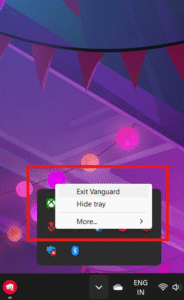
On the contrary, if you don’t play (or plan on playing) any other game that requires Vanguard, you can simply uninstall it:
- Open the Windows Settings app on your PC.
- Go to Apps > Installed Apps.
- Find Riot Vanguard in the list and click on the three dots.
- Select Uninstall.
Once this is done, you can hop on to the next step.
Step 3: Uninstall 2XKO
You should be able to uninstall 2XKO without any issues after Vanguard is taken care of. Do this:
- Open the Windows Settings app on your PC.
- Go to Apps > Installed Apps.
- Find 2XKO in the list and click on the three dots.
- Select Uninstall.
If you still can’t uninstall 2XKO, close the Riot Client app from the System Tray—like you did for Vanguard. Or, uninstall Riot Client if you don’t plan on playing other Riot games.
How to install (reinstall) 2XKO

If you always had the plan to reinstall 2XKO after uninstalling it—or simply regret deleting it—here’s how you can do it:
- Go to the official website of 2XKO.
- Click on Play For Free.
- Sign into your Riot account.
- And finally, click on Download.
- Let the download complete. If you had uninstalled Vanguard and Riot Client, this will reinstall those too.
After the installation is complete, 2XKO will be ready for you to enjoy, as good as new.






Published: Oct 9, 2025 09:07 pm