



Let’s face it, when you’re interacting with your teammates or the enemy team in Call of Duty: Modern Warfare 2 and Warzone, you have more fun. Whether it’s “playful” banter with enemies through proximity chat in Warzone or communicating with your teammates in MW2, speaking to either side augments your overall experience.
If your microphone’s volume is too low or too high, however, your experience can go from enjoyable to troublesome in a hurry. No one likes to troubleshoot their settings while in-game or out of the game, for that matter. If you want to skip the troubleshooting process, you will simply need to change how sensitive your microphone is to your voice.
To see exactly how to do that in MW2 and Warzone, check out the guide below.
Changing your mic sensitivity in MW2 and Warzone
The best mic sensitivity in a multiplayer shoot like MW2 or Warzone is one that cancels out most of the background noise in your gaming area while also being able to clearly pick up your voice. You don’t want your keyboard or fan to overpower your voice in the background, but you also want to ensure your mic is sensitive enough to pick up all of your callouts and trash talk.
To change your mic’s sensitivity, you need to head to the in-game settings of MW2 or Warzone. It is located in the drop-down menu located in the top-right corner of the lobby screen in either game.
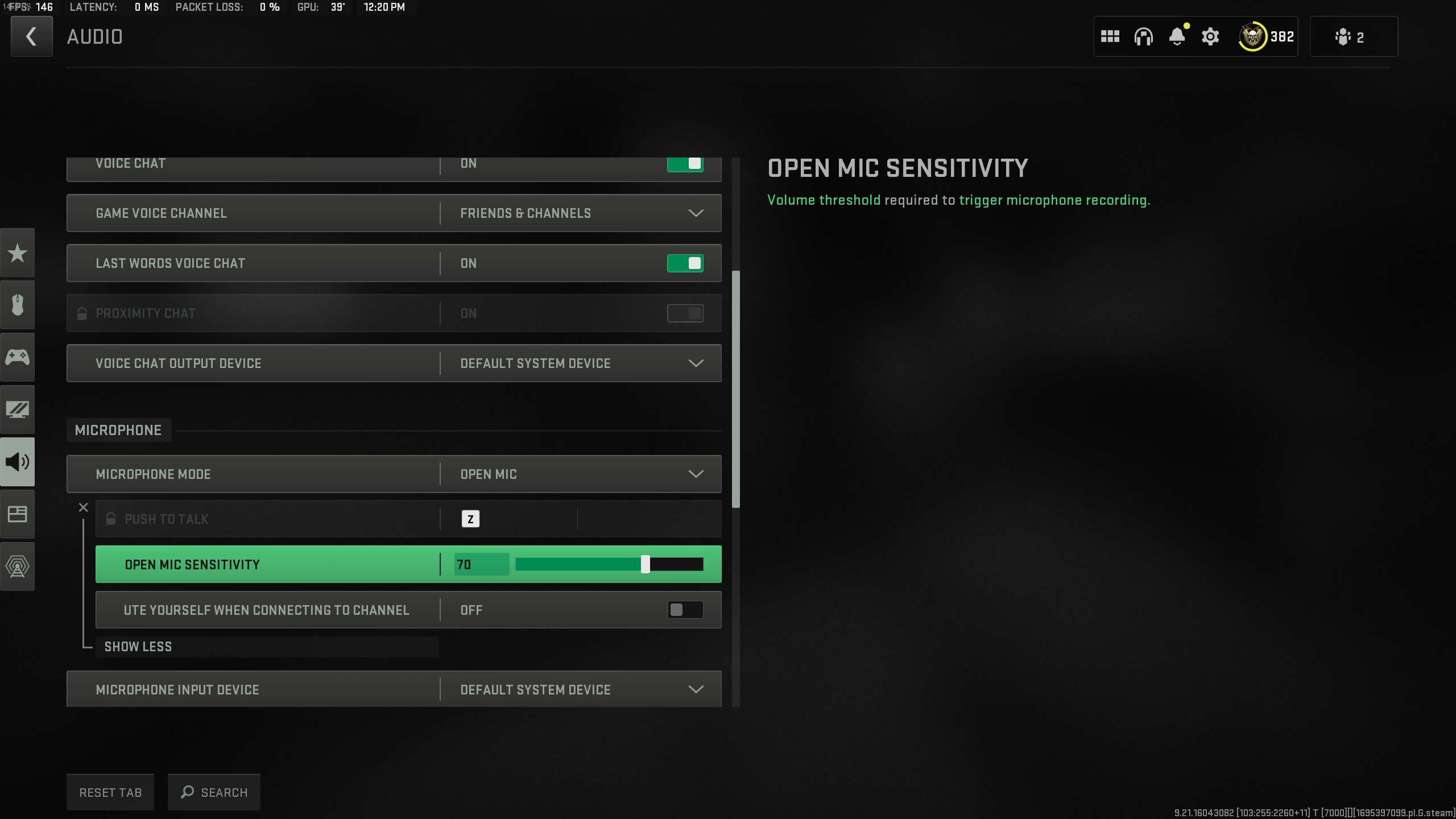
Once in the settings, navigate to the Audio tab and then scroll down to the Microphone section. Here, the first option you can select and change is called “Open Mic Sensitivity,” which you can change by clicking on the “Microphone Mode” option. To change the sensitivity, though, you need to ensure your Microphone Mode is set to “Open.”
Mic sensitivity in MW2 and Warzone 2, explained
After that’s done, you can slide the Open Mic Sensitivity meter anywhere from 0-100. The default point of the meter will be 70, which isn’t a bad starting point. But everyone’s mic and situation are different, so 70 might be too low or too high for you. I found that 70 was a little too sensitive for my microphone, as it would pick up a ton of extra background noise.
My suggestion is to get a friend in your lobby, and they can tell you if your mic needs to be adjusted in either direction. Just remember that lowering the mic sensitivity will make background noises quieter, but you need to talk louder to ensure your voice is being fully picked up. Conversely, raising the sensitivity means you don’t have to talk as loud or as close to the mic, but your background noises will be more noticeable.



Published: Sep 26, 2023 08:33 am