



If you are wondering how to change the difficulties in Titan Quest 2, you have arrived at the right place.
The sequel to 2006’s ARPG has finally made its way to us. While playing, you will come across situations when you wish the difficulty level of the enemies were a bit easier. Although you get to select a difficulty option when starting, that doesn’t necessarily measure the toughness of each enemy you face in the game.
Having said that, here’s everything you need to know about all the difficulty options in Titan Quest 2, and how to change them.
Table of contents
All difficulty options in Titan Quest 2
When you’re in the character creation screen, right off the bat, you will get three difficulty options:
- Neophyte
- Normal
- Hardcore
Normal is the default difficulty setting of the game. Neophyte is the easiest level where your character will take half damage while regenerating health faster.
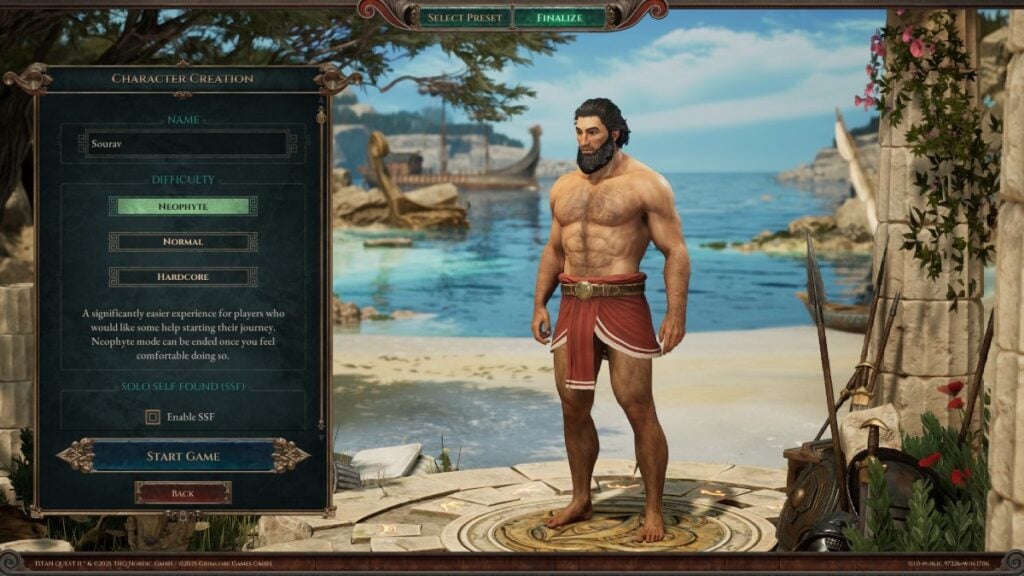
Hardcore is the hardest difficulty mode, where your character’s death is permanent, meaning you will have to create a new character again if you want to progress with the story.
This is exactly how the Hardcore mode in Diablo 4 works as well. “Once your character dies, they cannot be revived.”
How to change the difficulty level in Titan Quest 2
In Titan Quest 2, you can change the difficulty level by heading to the Shrine in the northern section of Pyrgo city.
Once you interact with the Rituals of Ares, you can either increase or decrease the enemy level. Remember, this will cost you Gold, so you will want to be stacked with the currency as much as possible.
The current enemy level will be shown just above the slider; increase or decrease the level, have the required Gold amount, and click the Accept button.
You also get two more options: Elevate enemy levels in previous areas and Respawn Enemies. Selecting the first option will increase the level of every enemy in previous regions. If you go back and kill them again, you will gain more XP and better rewards.
Choosing “Respawn Enemies” will respawn every enemy you’ve killed. These two options will cost a particular amount of Gold as well. Since there is no level scaling in Titan Quest 2, upgrading your attributes will allow you to fight higher-level enemies with ease.

Published: Aug 5, 2025 04:43 am