




If you’re facing the “unable to load persistence data” error in Battlefield 2042, it’s more common than you think, and here’s everything you need to know about fixing it.
This error occurs on all platforms, especially during peak times or after updates, and can cause loss of access to multiplayer features and progress. Its main causes are typically EA server outages, overloaded regions, weak home networks, corrupted cache or settings files, and crossplay-related conflicts.
Having said that, I have listed some ways you can implement to fix the error before hopping into the servers.
Table of contents
How to fix Battlefield 2024 ‘unable to load persistence data’ error
Since the error mostly happens due to EA server outages, the fixes are limited, and you can only do so much from your end. Here are some ways to fix the “unable to load persistence data” error in BF2042:
Restart the game and router
Try restarting the game. This is the most basic fix you can do, and it works wonders most of the time. It clears temporary glitches that trigger this error.
If you’re playing BF2042 using a router, try restarting that device as well—unplug it, wait 30 seconds, and then power it back up. This will refresh your connection.
Flush the DNS on PC
If you have a direct Ethernet connection to your PC (which you should anyway), try flushing the DNS. All you need to do is:
- Run the Command Prompt as an administrator
- Type the command: ipconfig /flushdns
- Press Enter
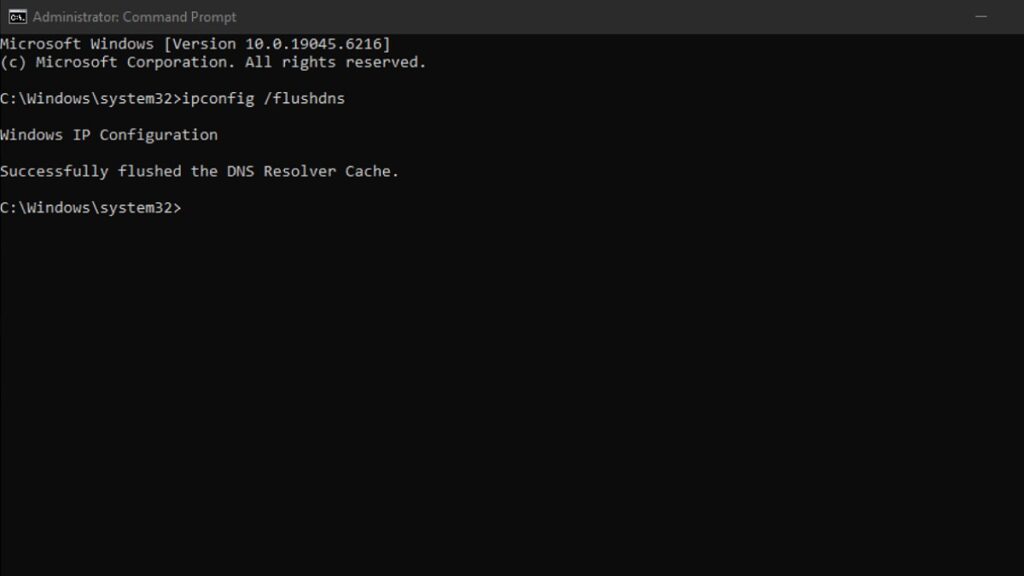
This command clears the DNS resolver cache and refreshes the connection. This method works well for multiplayer games, and you can give this a try for Battlefield 2042, too. Alternatively, you may try changing to Google’s DNS (8.8.8.8 and 8.8.4.4) to stabilize the connection further.
Disable crossplay
Disabling crossplay can also fix the ‘unable to load persistence data’ error. For PC players, go to Options, then General, and disable Crossplay from there.
Xbox players, follow the steps below:
- Go to Settings
- Then head to General
- Choose Online Safety > then Privacy & Online Safety > Xbox Privacy > Communication & Multiplayer
- Block cross-network play
Check the EA Server Status
If none of the above works, check EA’s server status from their official website. If EA’s servers are down, you’ll need to wait until service is restored. Server problems are a frequent cause when a new patch drops or a global event takes place.







Published: Aug 27, 2025 02:45 am