


If you’re unable to launch or play VALORANT due to the error code 40, don’t panic—you aren’t alone. With multiple player reports mentioning this issue since the tac shooter’s launch, the good news is that you’ve come to the right place to know how to fix it.
Being an online game, VALORANT is quite prone to errors caused by both client and server-sided triggers. The chances of encountering such issues are higher during or around an update’s release, when Riot is tinkering with the server or the player traffic is heavy. Some errors, like code 40, are rarer, and may appear randomly due to subtle hiccups, but there’s nothing to worry about.
Here’s why the VALORANT error code 40 appears and how to fix it.
What does VALORANT error code 40 mean and how to fix
The error code 40 in VALORANT appears with a message that reads: “There was an error connecting to the platform. Please restart your game client.” At first glance, you can tell it’s a connection error—but why is it appearing for you?
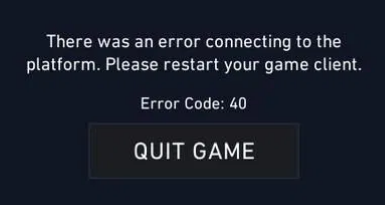
Well, the error code 40 usually indicates a server hiccup on Riot’s side. You may encounter it when trying to launch the game or while playing a match or in the lobby. This error usually pops up when the servers are taken down while you’re active in-game, or if a server bug is affecting VALORANT in your region. In most cases, you’d need to wait for the developer to fix the trigger. In some situations, however, it could be caused by a connection issue on your side.
If you’re facing the error code 40 in VALORANT right now, we recommend trying the following workarounds one-by-one to potentially fix it:
- Check if the servers are under maintenance. Riot usually takes down the servers right before deploying a patch, so if you’re expecting an update soon, this is likely the reason. You can also ask friends from your region if they’re experiencing similar server or connection errors. The servers may also go offline because of a bug. Whatever the reason, if the servers are down, you’ll need to wait for Riot to fix things and then download any available updates to get rid of the VALORANT error code 40 before you can return to the game.
- Try the workaround mentioned in the dialog box. Restart the game and Riot Client. If this doesn’t work, you can try logging out of the client and then logging back in.
- Restarting your PC or console may help resolve the VALORANT error code 40 sometimes.
- Try launching VALORANT as an admin.
Thankfully, error code 40 isn’t a common VALORANT error, but even if it does pop up on your screen going forward, you’re now equipped with everything you need to know. Or, you can always drop Riot Support a message.








Published: Sep 16, 2025 03:46 pm