




Want to refresh your identity in Mobile Legends: Bang Bang? Whether you’re rebranding your in-game persona, correcting a typo, or just looking for a fresh start, changing your name in MLBB is a simple process.
In this guide, we walk you through everything you need to know about changing your name in Mobile Legends, including how to get a name change card, important restrictions, and tips to avoid common mistakes.
Table of contents
How to change name in MLBB
There are many reasons why players choose to change their username in MLBB. You might feel that you’ve outgrown your old in-game name, want to have esports alias, or need to correct a typo made during sign-up. Some players rebrand for content creation or streaming purposes (just like what my nephew did to my account I lent him), while others simply want something more unique.
Whatever your reason may be, here’s how you can change name in Mobile Legends:
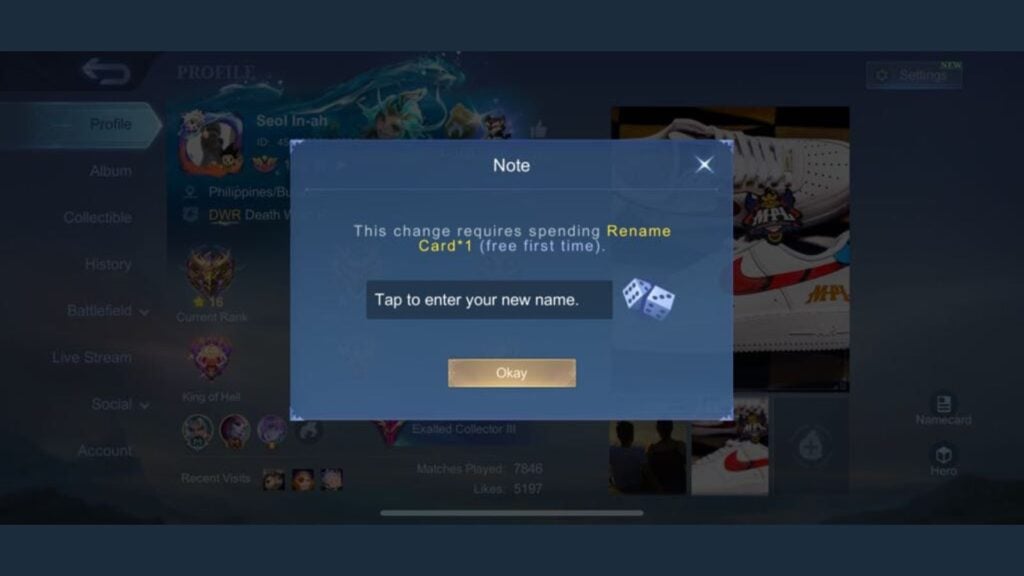
- Start by tapping your profile icon located in the top-left corner of the main screen. This will open your profile dashboard, where you can access your stats, achievements, and current in-game name.
- Then, tap on your existing username. A notification will appear, informing you that changing your name requires a Rename Card.
- Enter your desired new name in the text field provided, and confirm the change by tapping “Okay.”
Your first name change in MLBB is free of charge. However, any additional changes afterward will require a Rename Card.
How to get Rename Card in Mobile Legends
There are two main ways to get a Rename Card. The first is by purchasing it directly from the in-game Shop:
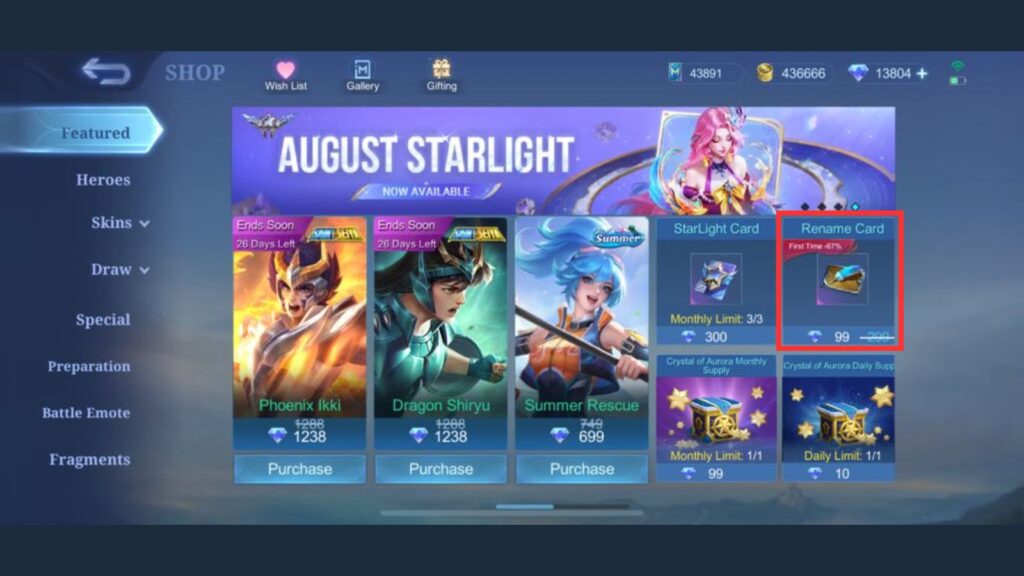
- Go to the Shop.
- Head to the Special section (if it’s not immediately visible under Featured).
- Look under the Items tab to find the Rename Card.
It usually costs 299 Diamonds, although the price may vary, especially if it’s your first time buying one. If you don’t have enough Diamonds, you’ll need to top up using real money.
The second option is to keep an eye out for free Rename Cards occasionally offered during special events or limited-time promotions (although I haven’t encountered one recently). While these opportunities are rare and may not happen frequently, MOONTON does sometimes include a Rename Card as a reward. Be sure to check the Events tab regularly and complete beginner missions, as these are the most likely sources of a free card.
Before finalizing your name change in MLBB, there are a few important rules. Your new name must be unique, meaning no two players can have the same username. It should also be between four to 16 characters long. Additionally, the name must not contain any profanity, hate speech, or special characters that violate the game’s terms of service. Emojis and unsupported symbols are not allowed, and previously used names may be temporarily reserved, preventing immediate reuse.
For more MLBB guides, check out how to hide your match history and use emotes to express yourself.









Published: Aug 7, 2025 03:37 am