



You might encounter adaptive triggers if you’re playing Battlefield 6 on PlayStation 5 or PC with a DualSense controller. Here’s everything you need to know about turning them off during the open beta.
Adaptive triggers are an immersive feature that simulates weapon recoil with physical resistance on the L2 and R2 buttons. They’re powered by the PS5 controller’s haptic motors and automatically enabled to enhance realism in BF6.
However, they can introduce a split-second delay or heavier pull, which can be the deciding factor in surviving and winning a gunfight. Here’s how you can turn it off.
Table of contents
How to turn off adaptive trigger in BF6 on PS5
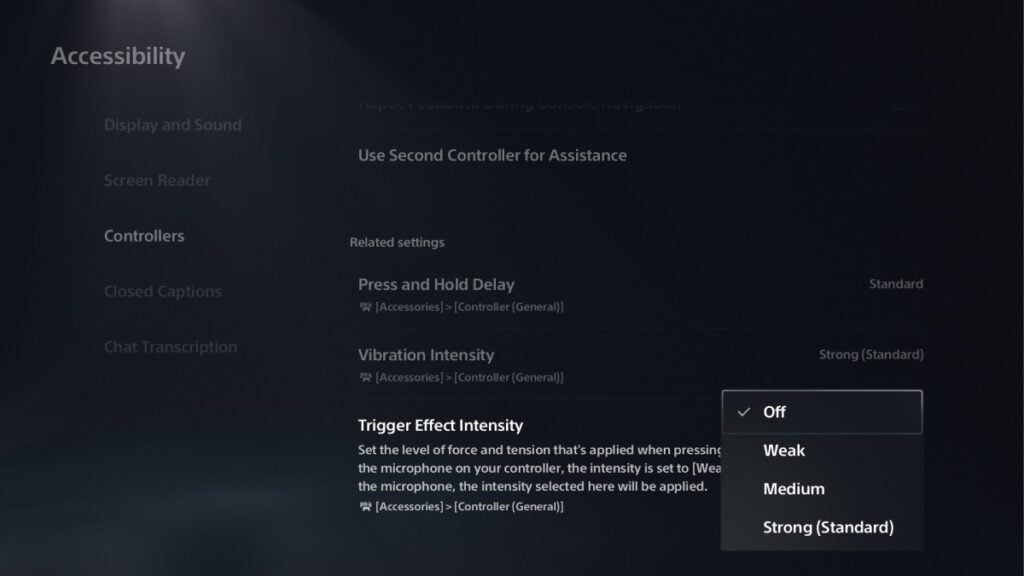
To turn off adaptive triggers while playing BF6 on PS5, all you need to do is:
- Start at your PS5 Home Screen
- Go to Settings
- Scroll down to Accessibility
- Click on Controllers
- Find the Trigger Effect Intensity option
- Change it from Medium, Weak, or Strong (Standard) to Off
- Exit the menu. The adaptive triggers are now disabled for every game and system-wide (unlike PC).
There is no in-game toggle option for this feature, and doing this will give you the feeling of the “weight” removed from your L2 or R2 buttons, allowing you to aim smoothly and responsively, similar to most competitive games.
How to turn off adaptive triggers in BF6 on PC
Steam
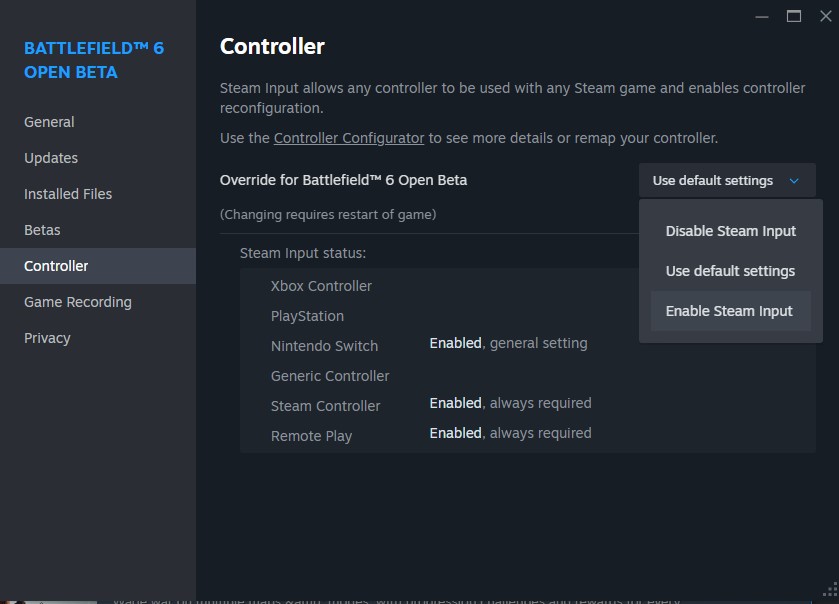
If you’re playing BF6 on Steam using a DualSense controller, follow the steps below to turn off adaptive triggers:
- Open Steam
- Click on the “Steam” option in the top-left corner
- Then select Settings
- Go to the Controller tab
- Then General Controller Settings
- Enable PlayStation Configuration Support
- Connect your DualSense (PS5) controller using USB or via Bluetooth
- In your Steam Library, right-click on Battlefield 6 and select Properties
- Go to the Controller tab and set Override for Battlefield 6 to Enable Steam Input
- Launch Battlefield 6 through Steam
Adaptive trigger resistance should now be gone, and Steam will emulate the triggers like a regular controller. You may also emulate Xbox inputs via Steam to disable adaptive triggers. Either method should work.
What about the EA App?
At the time of writing, the EA App doesn’t allow you to disable adaptive triggers for DualSense controllers. This means switching to Steam is the only option if you want more control.
Most pro and high-level players prefer to disable adaptive triggers for improved responsiveness and faster shooting in multiplayer games. Speaking of multiplayer games, check out our Battlefield 6 weapons tier list to add the best guns to your loadouts and dominate the lobbies.









Published: Aug 15, 2025 04:28 am